 UPSHOT
Run the game.
Follow your player.
Upshot is the game-day app for amateur teams. Keep score from the sideline in a few taps, and give every family the live score, the schedule and their child’s stats, all in one place.
- Basketball first
- Works without wifi
- Private by default
- Free during the pilot
See it in action
How Upshot works
Two short videos: the app for coaches, leagues and families, and how the Capture app fits in.
For coaches, leagues, families and scorekeepers
Read what the video shows
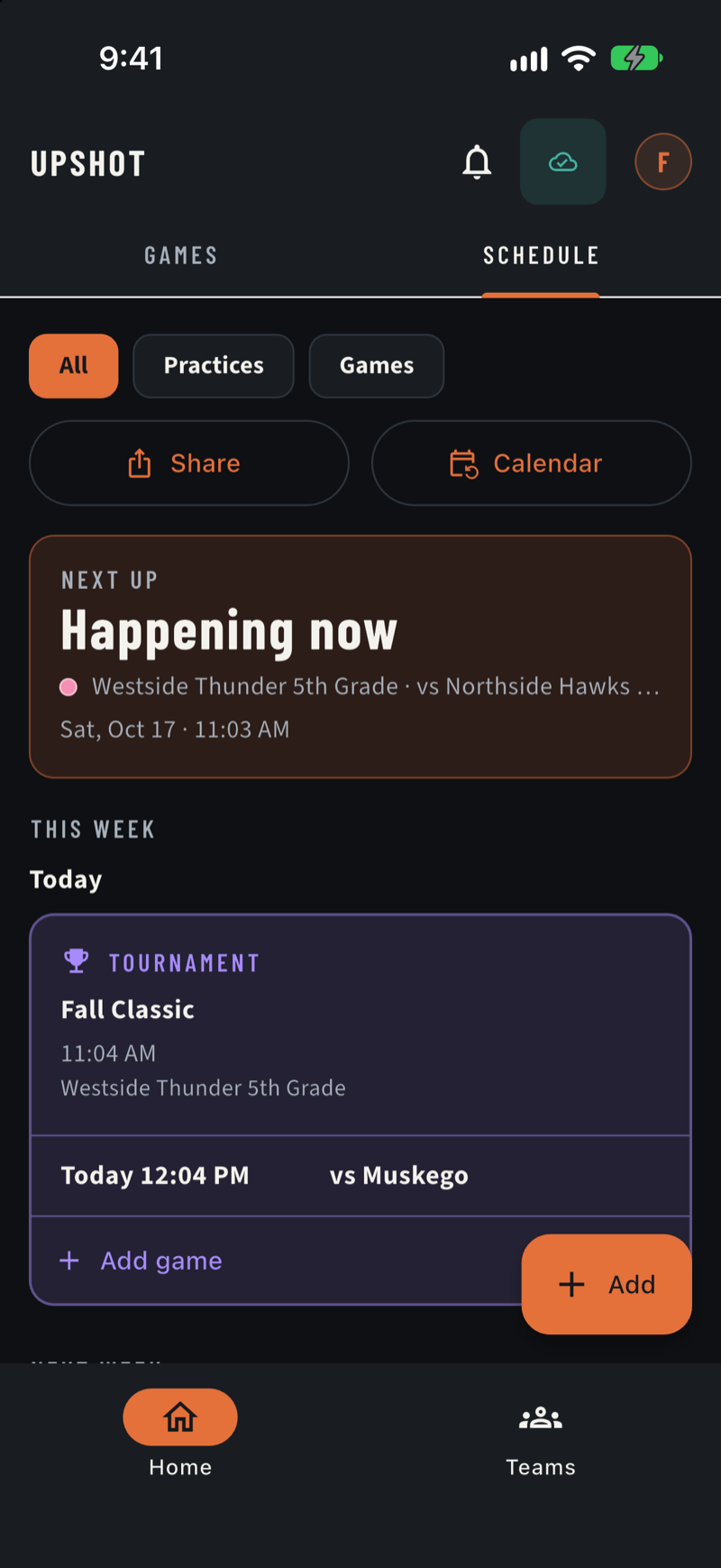
1. Coaches set up the team. Add players and a schedule, choose what parents can see, and tournaments show as one card. 2. Leagues run many teams. Publish one schedule to every team, share gym details and closed dates, and teams add their own notes on top. 3. Families join with a code. Enter the team code your coach shares, the coach approves each request, then follow the schedule, add it to your calendar and see the live score. 4. Scorekeepers tap the plays. Pick a player, tap what happened, undo in one tap, and it works without wifi.
Two apps, one game day
Read what the video shows
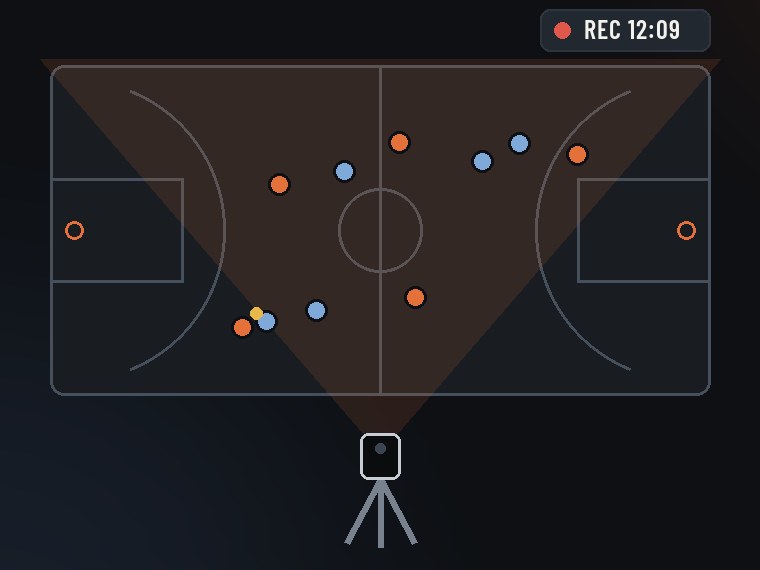
1. Record the whole court. A phone on a tripod with Upshot Capture films the whole court; you join the game with a code, and it keeps recording if the signal drops. 2. Score it from the sideline. A scorekeeper taps the plays in Upshot, with one-tap undo, even without wifi. 3. Families follow live. Every play reaches families in moments: the live score, box score and schedule. Coming next: highlight clips of every player and live video for your team.
How it works
From the first whistle to the final buzzer
Three steps, no gym wifi required.
Set up the team
A coach adds the roster and schedule. Families join with a team code, and the coach approves each request.
Keep score from the sideline
Whoever showed up, often a parent, picks the player and taps what happened. Every play can be undone.
Families follow along
The schedule, the live score and each child’s stats are one tap away, on any phone.
Live scorekeeping
Score the game in a few taps
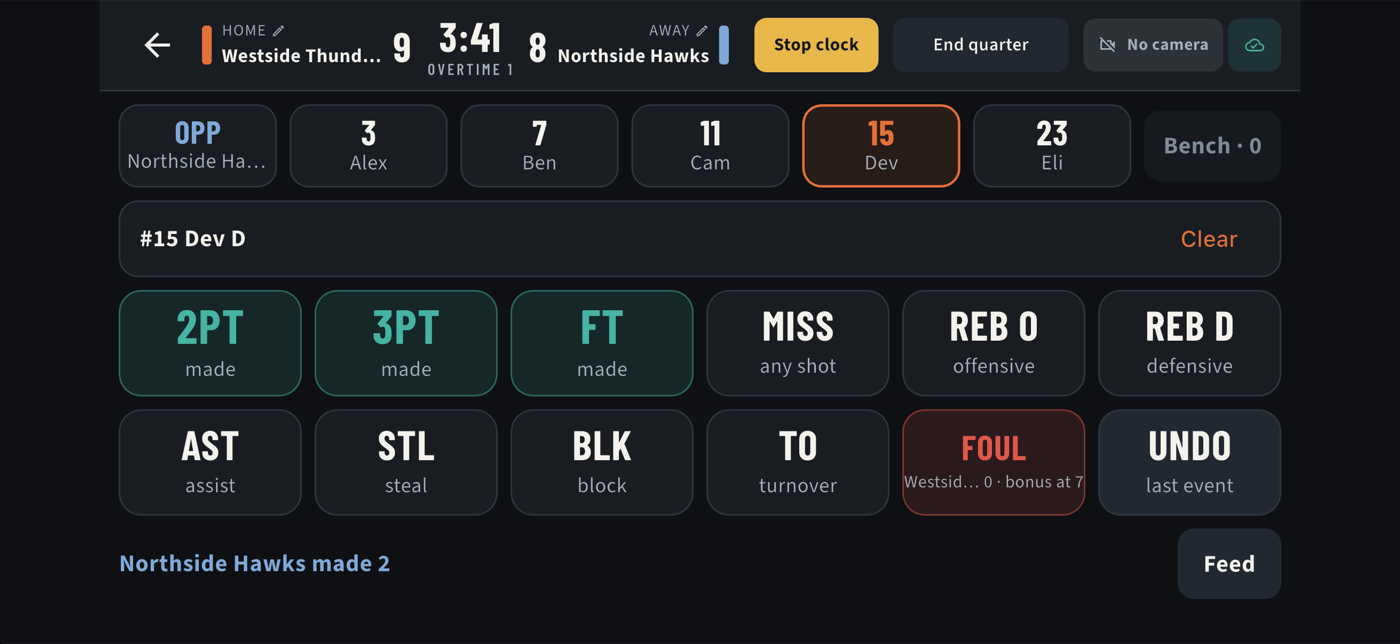
Pick a player, tap what happened. The big, high-contrast tiles are built for a loud, bright gym and one-handed use, on a phone or a tablet.
- Undo beats confirm. No pop-ups in the middle of play; any play can be taken back with one tap.
- Works without wifi. Everything is saved on the device first and syncs the moment it can. A game is never lost to bad signal.
- Fouls, subs and the clock are all there, with a clear warning if the game clock isn’t running.
Schedule
A schedule everyone can trust
Games, practices and tournaments in one list, with the place, the time and the notes. When something is cancelled, it stays on the schedule, marked and explained.
- Tournaments stand out. A weekend tournament is one card with every game listed inside: time, opponent and court.
- On your phone’s calendar. Subscribe once and the schedule stays up to date on its own.
- Directions and gym details are one tap away, so nobody is lost on game day.
Upshot Capture
Record the whole game with one phone
Upshot Capture is a small companion app. Put an iPhone or iPad on a tripod and it films the whole court, then ties the video to the scorekeeper’s plays so any moment can be found later. No special camera to buy.
- Set up in a minute. Put the phone on a tripod, join the game with a code, and tap record.
- Built to never lose a game. It watches the battery, heat and storage, and the recording keeps going even if something else fails.
- Uploads after the game. In the background, and it picks up where it left off if the connection drops.
- Private to your team. No public links, ever. Only people on the team can watch.
Available to pilot teams on iPhone and iPad. Highlight clips and live video come next, and live scoring works today with or without it.
Where we’re headed
The whole family in the gym, even from home
A preview of what the Capture phone makes possible: the game on every family’s phone, wherever they are. Live scoring works today; live video and highlight clips are coming soon.
Concept preview made with AI video tools. Live video is not available yet.
Read what the video shows
A parent sets a phone on a small tripod at the sideline of a youth basketball game, and it films the whole court. Kids run a fast break while the phone records. Then a parent at work cheers as the same game plays live on her computer and phone, and a parent in the bleachers holds up a phone to show a smiling child the game on screen. The clip ends on the phone on its tripod.
Who it’s for
Everyone on the sideline
Run the team
Roster, schedule, practice plan, and who can do what. Set it up once and everyone sees the same thing.
Keep an accurate game
Minimal effort, even if you’ve never done it. Big buttons, one-tap undo, and nothing to learn first.
Never miss a moment
The live score, the schedule, and your player’s stats. No more asking the group chat what time it is.
For leagues
Built to scale from one team to a league
Directors publish schedules straight to every team, share gym details and closed dates, and teams keep their own notes on top. A league has the same schedule everywhere, from one place.
Privacy
Private by default, because kids are involved
Most of the people in Upshot are children. We designed for that from day one, not as an afterthought.
- Nothing is public.There are no public profiles, no public video and no public links.
- Your child’s stats stay with your family.By default, a family sees their own player’s stats. A team can choose to share more.
- Families join by invitation.Joining takes a team code, and a coach approves every request.
- No ads, and we never sell personal information.Read the full privacy policy.
- You’re in control.Delete your account from inside the app, any time.
Highlights of every player
Prop a phone on a tripod and let it record the whole court. We’re building automatic highlight clips for each player, with a person always confirming the calls. Scorekeeping comes first, and it’s here today.
Questions
Good to know
What does it cost?
Upshot is free while we pilot it with local teams. There are no ads, and live scores stay free.
Which sports does it support?
Basketball first. Upshot is built so other sports can follow without starting over.
Do we need wifi in the gym?
No. The app saves everything on the device and syncs when it’s back online, so a game is never lost.
Who can see my child’s information?
Only people on the team, and only what the team allows. By default, families see their own player’s stats. Nothing is public. The privacy policy has the details.
How does my family join a team?
Your coach gives you a team code. Enter it in the app, tell us who your child is, and the coach approves the request.
Do we need the Capture app?
No. Scorekeeping and the live score work on their own. Capture adds video: it films the whole court so highlights can be made later.
Where do I download it?
Upshot is coming to the App Store and Google Play. During the pilot, teams get early access first; the buttons at the top of this page turn into download links when the apps are published.
Is there an Android version?
We’re starting on iPhone and are working toward Google Play.
Get Upshot for your team
We’re running a free pilot with local teams and leagues. The App Store and Google Play versions are on the way.